Texture pack review
Animated RGB GUI
Animated RGB GUI latest build for Minecraft 1.21
The Animated RGB GUI Pack by CrisXolt transforms your Minecraft interface by adding a vibrant, animated RGB experience to the GUI elements, enhancing the visual feel of your gameplay.
Overview
In-depth
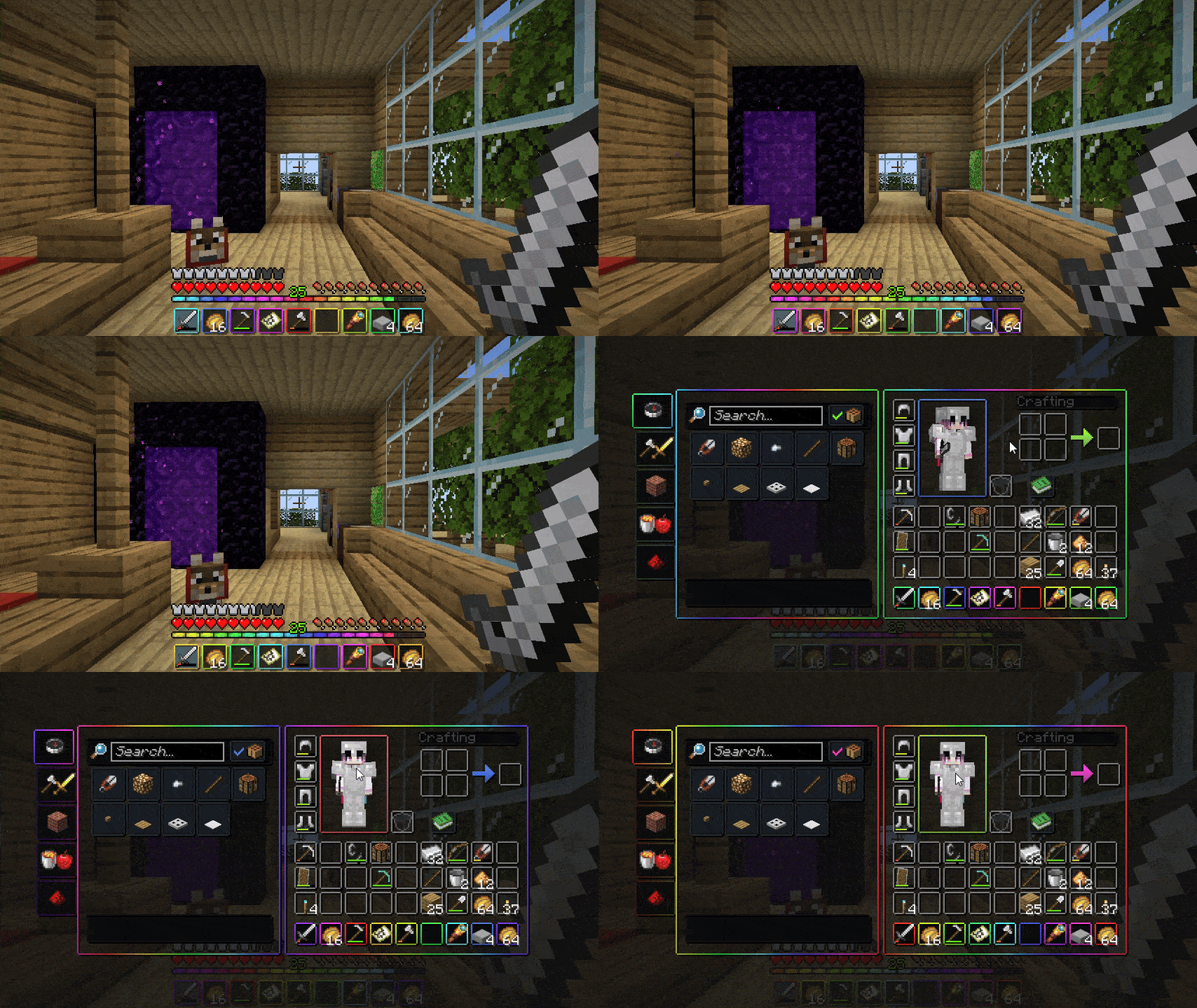
Dive into the realm of vibrant visuals with the Animated RGB GUI Pack from CrisXolt. This pack gives your Minecraft interface a stunning upgrade by bringing animated RGB effects to various GUI elements like your XP bar and hotbar. The eye-catching wave effect is made possible with either OptiFine or Animatica (Fabric), so make sure you've got one of those set up to really see the magic happen.
The pack features a total of 40 frames of animation, making everything from your inventory screens to crafting interfaces come alive with color. It's not just about the hotbar; nearly every aspect of your GUI has received a colorful infusion. You’ll find enhancements on the Anvil, Brewing Stand, Crafting Table, and even the Villager interface, which brings a whole new level of excitement to those mundane tasks.
Visually, the pack leans into a vanilla-plus style, staying true to the game while adding an energetic flair. The background tile textures use "Deepslate Tiles" for the menu, and the panoramic backdrop immerses you in the mysterious vibe of the Deep Dark. This makes your gaming environment not only functional but also vibrant and engaging.
Make sure to check out this pack and explore how it can redefine your experience in Minecraft. It's compatible with versions like 1.19.4, 1.20, 1.20.1, and 1.21, catering to a wide range of players. If you're curious about other cool enhancements, feel free to browse the collection of Minecraft texture packs shared on our site.
Gallery
Screenshots
Animated RGB GUI in game, captured across biomes and lighting conditions.

What you get
Why Animated RGB GUI?
Curated resource pack
Animated RGB GUI ships as a custom vanilla+ pack that stays crisp at every render distance.
Runs standalone
Drops into the vanilla resource pack folder. One ZIP, one profile.
Loader compatible
Plays nicely with Minecraft Vanilla. Slot it into a modded profile the same way you would on vanilla.
Consistent identity
Colors, edge weight, and pixel language stay coherent across blocks, entities, and UI.
Regular updates
CrisXolt keeps the pack in step with new Minecraft snapshots.
Free and documented
Distributed under an open license with a full changelog per release.
Downloads
Get Animated RGB GUI
The 3 most recent Animated RGB GUI builds, direct mirror links, no ad redirects.
Install
How to install Animated RGB GUI
Vanilla route
- 1Download the ZIP for Minecraft 1.21 from the table above.
- 2Open Minecraft, then Options, then Resource Packs, then Open Pack Folder.
- 3Drop the ZIP into that folder without extracting it.
- 4Select Animated RGB GUI in game, move it to the enabled column, hit Done.
Modded route (Minecraft Vanilla)
- 1Install Minecraft Vanilla for Minecraft 1.21.
- 2Launch the modded profile once so the resourcepacks folder is created.
- 3Drop the pack ZIP into .minecraft/resourcepacks/.
- 4Enable the pack from the in game menu and relaunch if needed.
◎ Compatibility
✓ Tested and confirmed working on Minecraft 1.21
We ran Animated RGB GUI on Minecraft 1.21 even though the pack was not officially built for this version. Texture packs typically stay compatible across nearby Minecraft releases, and this one runs as expected.
Troubleshooting
Common problems
Pack shows a red exclamation mark in the resource pack menu.
The pack format does not match your Minecraft version. Grab the build from the downloads table that lists your exact MC version.
Textures look glitchy on entities or items.
Enable Custom Entity Models (CEM) and Custom Item Textures (CIT), both under Video Settings, Details on Optifine.
Pack loads but nothing changes in game.
You dropped it in the wrong folder. Use Options, Resource Packs, Open Pack Folder.
Black screen after enabling the pack.
Older GPU with high pack resolution. Lower render distance, update GPU drivers.
FAQ
Frequently asked questions
Is Animated RGB GUI free?+
Yes. It ships under an open license, every build in the downloads table above is free.
Do I need Optifine or shaders?+
No, the pack runs on vanilla Minecraft. Optifine unlocks extras like connected textures if you want them.
Does it work on Bedrock?+
No. This is a Java Edition pack.
Which Minecraft versions work?+
Officially: 1.19.4, 1.20, 1.20.1, 1.21. Texture packs typically remain compatible with nearby Minecraft versions.
Who maintains it?+
CrisXolt. The changelog lives on each version row in the downloads table.
Ready to install?