Texture pack review

Cobblemon 3D Poke Rods

Cobblemon 3D Poke Rods 32x, latest build for Minecraft 26.2

This simple add-on introduces custom 3D models for all the Poké Rods in the Cobblemon mod, replacing the flat sprites with actual depth.

Platform
Java
Author
Redcowboy
First release
Jan 2, 2025
Latest version verified
26.2

Overview

In-depth

Cobblemon 3D Poke Rods updates the look of Poké Rod items by replacing flat sprites with small three dimensional models that match the Cobblemon mod aesthetic. The pack focuses on a narrow but visible change, giving each rod a bit of depth and shape so they read better in inventory and in hand.

The textures use a 32x resolution and keep the original color palette, so these models feel like a natural extension of the base mod rather than a complete overhaul. The author, Redcowboy, has kept the scope intentionally small, targeting only the Poké Rods rather than broader equipment or mobs. That makes the pack an easy add-on for players who already enjoy Cobblemon and want a modest visual polish.

Installation is simple for vanilla Minecraft players who use resource packs, and the pack is listed under the mods category on our site for quick discovery. For other compatibility notes and related packs browse our main texture pack directory for more options.

Design notes and compatibility

Because this is an add-on focused on item models, it works alongside most resource packs that do not override the same item model paths. It does not change block textures, entities, or GUI elements, and it keeps the standard 32x look so performance impact is minimal. The pack is distributed under a Creative Commons Attribution Non Commercial license, so it can be used for personal play or shared with credit to the author but not used commercially.

Gallery

Screenshots

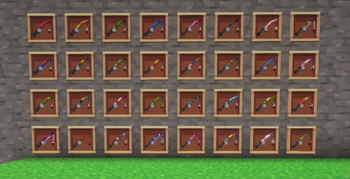
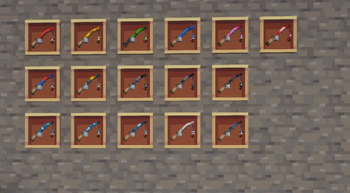
Cobblemon 3D Poke Rods in game, captured across biomes and lighting conditions.

Cobblemon 3D Poke Rods 32x mods Minecraft texture pack screenshot 1Cobblemon 3D Poke Rods 32x mods Minecraft texture pack screenshot 2

What you get

Why Cobblemon 3D Poke Rods?

01

Clearer item readability

Three dimensional models make Poké Rods easier to identify in a crowded inventory, reducing misclicks while managing items during gameplay.

02

Consistent 32x style

The pack preserves the 32x resolution, so models match other textures and avoid visual clashes with similar resolution packs.

03

Small scope, low risk

Because it changes only the Poké Rods, this add-on is less likely to conflict with larger texture packs or require extensive merging.

04

Fits Cobblemon aesthetic

Design choices reflect the Cobblemon mod style, helping the models feel native rather than out of place in modded play.

05

Minimal performance hit

Simple 3D item models at 32x resolution usually add negligible load compared to high resolution packs or entity model changes.

06

Easy to enable and disable

As a focused resource pack, you can toggle it on or off quickly without altering broader texture setups.

Downloads

Get Cobblemon 3D Poke Rods

The 1 most recent Cobblemon 3D Poke Rods builds, direct mirror links, no ad redirects.

StatusReleaseMinecraftLoaderDateDownload
LatestCobblemon 3D Poke Rods v1.0MC 1.21.1Minecraft VanillaJan 3, 2025Download ↗

Install

How to install Cobblemon 3D Poke Rods

Vanilla route

  1. 1Download the Cobblemon 3D Poke Rods resource pack file to your computer.
  2. 2Open Minecraft, go to Options, then Resource Packs, then Open Pack Folder.
  3. 3Move the downloaded pack file into the opened resourcepacks folder.
  4. 4Back in Minecraft, enable Cobblemon 3D Poke Rods from the Available list and move it to Selected.
  5. 5Click Done to apply the pack and restart the game if item models do not appear immediately.

Modded route (Minecraft Vanilla)

  1. 1Install the Cobblemon mod for the matching Minecraft version before applying any packs.
  2. 2Use Fabric or Forge for your mod loader, and install Optifine only if you need extra model support.
  3. 3Place the Cobblemon 3D Poke Rods file into the resourcepacks folder as with vanilla installs.
  4. 4Launch the modded profile, enable the pack in Options, Resource Packs, and confirm models appear.
  5. 5If using other mods that change item models, load order may need adjustment in the resource pack menu.

◎ Compatibility

✓ Tested and confirmed working on Minecraft 26.2 and 26.1.2

We ran Cobblemon 3D Poke Rods on Minecraft 26.2 and 26.1.2 even though the pack was not officially built for these versions. Texture packs typically stay compatible across nearby Minecraft releases, and this one runs as expected.

Also compatible

Troubleshooting

Common problems

Models not showing in inventory

Ensure the pack is enabled in Minecraft Options, Resource Packs. Restart the game if the models still do not appear.

Visual clipping with another pack

Disable other resource packs that modify the same item paths or adjust load order so Cobblemon 3D Poke Rods has priority.

Broken models after a mod update

Verify the resource pack targets the current item model paths; re-download the pack or contact the author for an updated build.

Pack conflicts in modded environment

Run Minecraft with only necessary mods, then add packs one at a time to identify the conflict, adjusting load order as needed.

FAQ

Frequently asked questions

What Minecraft versions does this pack support?+

The pack lists compatibility with 1.21.1. Texture packs often remain compatible with nearby Minecraft versions even when they were not officially built for that release, so testing on adjacent versions may work.

Will this hurt my FPS?+

Simple 32x item models usually have minimal performance impact, but overall FPS depends on other active packs, mods, and your hardware.

Can I use this on Bedrock Edition?+

This pack is authored for Java resource packs and item model formats, so it is not directly compatible with Bedrock without conversion.

Is Optifine required to see the 3D models?+

Optifine is not required for basic resource pack item models, but some modded setups use Optifine for extra model features; it is optional in modded installs.

Are there risks using this pack on a multiplayer server?+

Resource packs are client side, so using this pack generally carries no server risk. Some servers provide mandatory packs, so follow server rules and do not run packs that alter gameplay in prohibited ways.

Ready to install?

Download Cobblemon 3D Poke Rods and jump in