Texture pack review
Cobblemon Emissive Ores
Cobblemon Emissive Ores latest build for Minecraft 26.2
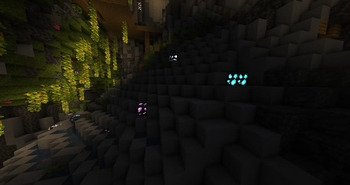
This pack adds emissive textures to Cobblemon ores, making them much easier to spot in dark caves or underwater without flooding the area with torches.
Overview
In-depth
Cobblemon Emissive Ores updates the look of ore blocks by adding emissive textures, helping those blocks stand out in low light without changing block behavior. This is a focused aesthetic change rather than a gameplay mod, and the pack is aimed at players who want better visual cues while exploring caves or underwater ravines.
The texture set keeps the base ore designs familiar, applying a soft glow to veins so they draw the eye at a distance. Because the pack targets only ore textures, it plays nicely with many other themed or general packs that do not override ore art. The author notes the change is primarily visual, and it does not add light to the world, so you should not expect dark areas to become brighter in gameplay terms.
Installation is straightforward for standard Minecraft, and the pack uses the vanilla resource pack loading system so most players can try it without extra tools. For those managing many packs, the organization is compact and limits conflicts by only altering specific textures. You can browse more texture packs on the site, including similar themed packs in the themed category, to pair this pack with broader environment or UI packs.
Performance impact is minimal, because the files are limited to a small set of textures rather than large shader changes. Players using Optifine or Fabric with resource management mods can still use this pack, though some mod setups may require adjusting load order. The license is permissive, and the author provides the pack under a standard open source license that allows reuse within its terms.
Quick takeaways
Cobblemon Emissive Ores is a lightweight cosmetic pack that makes ores easier to spot in darker areas without changing overall lighting. It is best suited for players who prefer clearer resource hunting without adding extra light sources or changing core visuals beyond ore highlights.
Gallery
Screenshots
Cobblemon Emissive Ores in game, captured across biomes and lighting conditions.

What you get
Why Cobblemon Emissive Ores?
Easier ore spotting
Glowing ore veins are more visible in low light, reducing the need to place torches to find resources quickly.
Minimal performance cost
Only a small set of textures are changed, so systems with modest hardware should not see significant slowdown.
Vanilla friendly
Designed for Minecraft vanilla resource loading, making it simple to add or remove without extra tools.
Works with themed packs
Limited scope reduces conflicts, so you can combine it with broader themed or environment packs.
Open license
Provided under a common open source license, allowing reuse under the license terms without proprietary restrictions.
Clear visual focus
Targets only ore textures, keeping the rest of the world art unchanged for a subtle, specific improvement.
Downloads
Get Cobblemon Emissive Ores
The 4 most recent Cobblemon Emissive Ores builds, direct mirror links, no ad redirects.
Install
How to install Cobblemon Emissive Ores
Vanilla route
- 1Download the Cobblemon Emissive Ores pack file from the author page.
- 2Open Minecraft and go to Options, then Resource Packs, then Open Pack Folder.
- 3Move the downloaded pack zip into the resourcepacks folder and close the folder.
- 4Return to Minecraft, find the pack under Available, and click the arrow to enable it.
- 5Confirm it is active in your world, then reload resource packs if textures do not appear.
Modded route (Minecraft Vanilla)
- 1Place the Cobblemon Emissive Ores zip into the resourcepacks folder used by your modded launcher.
- 2Launch Minecraft with Fabric or Forge, with Optifine optional for additional texture features.
- 3Open Options, then Resource Packs, and enable the pack from Available to Selected.
- 4Adjust mod pack load order if another mod replaces ore textures, then reload resource packs.
◎ Compatibility
✓ Tested and confirmed working on Minecraft 26.2 and 26.1.2
We ran Cobblemon Emissive Ores on Minecraft 26.2 and 26.1.2 even though the pack was not officially built for these versions. Texture packs typically stay compatible across nearby Minecraft releases, and this one runs as expected.
Troubleshooting
Common problems
Textures not showing
Make sure the pack is enabled in the resource packs menu and reload resource packs, then verify the file is in the correct resourcepacks folder.
Conflicting ore art
If another pack overrides ore textures, move Cobblemon Emissive Ores higher in the resource pack order to take priority.
No actual light emitted
This pack only changes appearance, not lighting; use torches or a mod that adds emissive light if you need illumination.
Visual glitches with shaders
Disable or tweak shader settings, or test without the shader to confirm the pack, some shader combinations alter emissive render behavior.
FAQ
Frequently asked questions
Which Minecraft versions does Cobblemon Emissive Ores support?+
The pack lists support for 1.19.2, 1.20.1, and 1.21.1. Texture packs generally remain compatible with nearby Minecraft versions even when they were not officially built for that release.
Will this pack affect performance?+
The scope is small and should have minimal impact for most systems. Players with extremely limited memory might notice a small change when many packs are active.
Can I use this on Bedrock Edition?+
This pack is designed for Java resource pack loading, and Bedrock uses a different format, so it will not work natively on Bedrock without conversion.
Do I need Optifine to use it?+
Optifine is not required, the pack works with vanilla resource loading. Optifine can be used optionally for additional texture features or performance tweaks.
Is there any risk using this pack on servers?+
Resource packs are client side and generally safe to use, but some servers enforce packs or require specific configurations; check server rules before joining.
What if ores still look unchanged?+
Confirm the pack is enabled and above other packs that modify ores, then reload resource packs; texture packs often stay compatible across nearby versions even without explicit updates.
Ready to install?