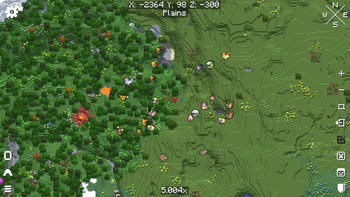
Texture Pack // by Emery319
E19 - Cobblemon Minimap Icons
Track your favorite Cobblemon on your map with classic sprite icons.
- Latest
- Minecraft 26.2 / 26.1.2
- Updated
- Jul 12, 2026
- Resolution
- —
- Style
- Mod Support
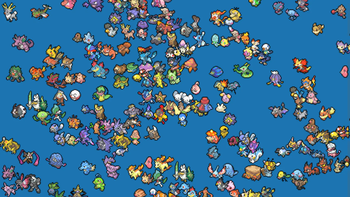
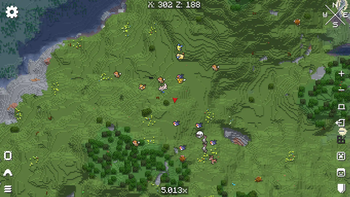
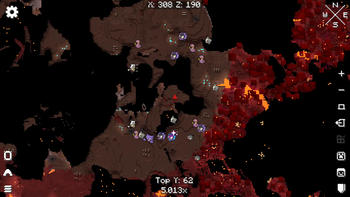
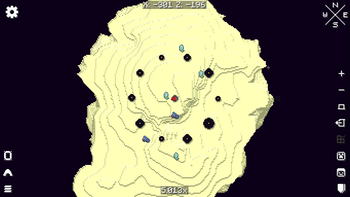
Tired of seeing generic dots or weird model headshots on your map while hunting for rare catches? The E19 - Cobblemon Minimap Icons pack fixes that by replacing those messy markers with clean, recognizable pixel art. These sprites help you identify exactly which creature is nearby at a glance. It makes wandering through the wilderness a lot more efficient since you won't have to keep running up to every entity just to see what it is.
The visual style centers on classic sprites that fit the feel of Minecraft texture packs usually favored by modded players. One of the best parts about this pack is the variety. It covers all the standard base game forms, naturally, but it also goes deep into variations. If you find a shiny, there is a specific version for that, including an option for shiny icons that aren't specifically marked if you prefer a subtle look. It also handles all the unique forms and special variants that Cobblemon is known for.
Compatibility is massive here. While it is built for Xaero's Minimap, it doesn't just stop at the base mod. The author has included support for a huge list of addons, ranging from Fakemon packs and legendary expansions to specific model remakes like the Combee MC Remodel. If you use a lot of resource packs for your Cobblemon setup, this icon set likely has you covered for those extra creatures too.
Setting it up is pretty basic. You just need to make sure your minimap settings are toggled to show entity icons all the time. If your map feels too cluttered with vanilla mobs, you can even tweak your config files to only show the Pokemon icons, which makes tracking much easier. It is a simple tool that really changes how you navigate your world when you are looking for that one specific spawn.