Texture Pack // by CyberRat2
Enchantment Descriptions Compat
Natural tooltips for your favorite modded enchantments
- Latest
- Minecraft 1.21.1
- Updated
- Jul 12, 2026
- Resolution
- —
- Style
- Themed
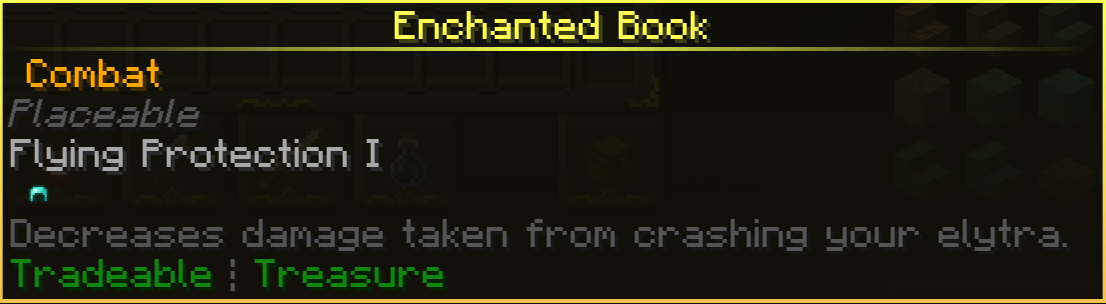
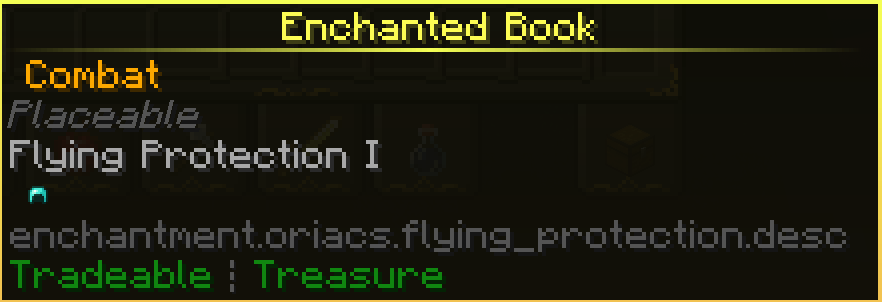
If you use the mod that shows what enchantments actually do, you’ve probably noticed that many modded items just show a blank space or nothing at all. Enchantment Descriptions Compat fixes this by manually adding the missing text for a bunch of different mods. It is pretty annoying to have to tab out of the game just to remind yourself what a rare book does, so having that info right there in the inventory is a huge time saver.
The pack covers a wide range of content. It adds descriptions for big projects like Apotheosis and Deep Aether, but also handles smaller ones like Wall Jump or Spawners Plus. Because it is a resource pack rather than a code heavy mod, it works across almost any version from 1.16 up to the latest 1.21 updates. It is one of those Minecraft resource packs that you just leave in your folder and forget about because it makes the UI feel much more complete.
Whether you are playing on Forge or Fabric, the compatibility remains the same. It is worth noting that some mods eventually add their own descriptions in newer versions, but for everything else, this pack fills those holes. It targets specific mods like Deeper and Darker, Ars Additions, and Tough as Nails to make sure your specialized gear is easy to understand at a glance.
Visually, it does not change your blocks or items. It just ensures the text for modded effects matches the style of the vanilla ones so nothing looks out of place. If you are running a heavy modpack and want your tooltips to actually be useful, you can find this at Modrinth. You can also browse more packs if you want to find other ways to tweak your game interface or world visuals.