Texture Pack // by CaptainEnder
Tree Xray (Unobtrusive Leaves)
Clearer views for easier wood harvesting
- Latest
- Minecraft 26.3 / 26.2
- Updated
- Sep 13, 2026
- Resolution
- 16x
- Style
- Simplistic
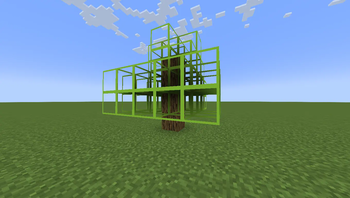
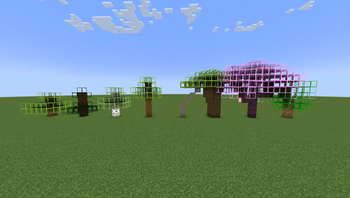
Tired of punching through piles of leaves just to find that last bit of wood? Tree Xray (Unobtrusive Leaves) fixes one of the most annoying parts of gathering wood. Most Minecraft texture packs keep leaves thick and solid, which makes it nearly impossible to see where the branches actually go. This pack changes the leaf textures so they are mostly clear but still have a visible outline so you know the block is there.
The main goal here is utility. By using Tree Xray (Unobtrusive Leaves), you can walk up to a massive oak or a birch tree and see exactly where the logs are hidden. It saves a lot of time specifically when dealing with those tall, messy oak trees that have wood going off in five different directions. You can just look through the foliage and aim your axe at the logs without guessing. The style stays very close to the 16x vanilla look, so it doesn't feel like you've completely broken the game visuals.
It works fine on modern versions like 1.21 and 1.21.4. Since it is built for the vanilla loader, you do not need any extra mods to get the transparency to work correctly. It is a lightweight change that makes farming much faster. If you want to find more useful tools or visual upgrades, you can browse more texture packs to see what else fits your setup.
Overall, this is just a handy thing to have in your folder for when you need to clear a forest or build something huge with wood. It gets rid of the frustration of missing logs that keep leaf decay from starting.