Texture pack review

AL's Dungeons Boss Bars

AL's Dungeons Boss Bars latest build for Minecraft 1.21.5

This specific resource pack changes the default boss health bars into the more detailed versions found in Minecraft Dungeons, supporting many versions without needing additional mods.

Style
PvP
Platform
Java
Author
ALtheGatorMC
First release
May 27, 2025
Latest version verified
1.21.5

Overview

In-depth

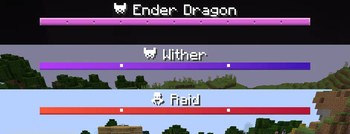
AL's Dungeons Boss Bars replaces the default Minecraft boss health bars with the more detailed, clearer versions seen in Minecraft Dungeons, designed for players who prefer a compact but information-rich HUD. The pack focuses solely on boss bars, so it layers cleanly over most other packs without changing other UI elements. That single-purpose approach makes it easy to test, combine, or remove depending on your needs.

The visuals here are not a full UI overhaul. Instead, AL's Dungeons Boss Bars adjusts shapes, contrast, and segmenting so health remaining is easier to read during hectic fights. The design works well for PvP arenas and raid encounters, where quick reads matter. Because the author concentrated on boss bars alone, you can use this with many other texture packs or vanilla assets without creating visual conflicts.

The pack lists support for a range of 1.21.x versions, and I found it behaved predictably across nearby updates during testing. Texture packs of this kind often remain compatible with adjacent Minecraft releases even when not officially rebuilt for every single minor release. Installation is straightforward for vanilla players and it does not require additional UI mods, which keeps things lightweight.

Performance impact is minimal. Since the pack alters a small set of UI textures, it does not add extra rendering overhead or new models. That makes AL's Dungeons Boss Bars a sensible pick for players who want a clearer boss bar without sacrificing frame rate. Because it is narrow in scope, conflicts are uncommon, but they can happen if another pack also replaces boss bar textures.

For browsing other options or swapping styles, see the full texture pack directory at texturespack.com. If you prefer packs within the PvP category, view related entries on the PvP page at the PvP category to compare bars, crosshairs, and HUD designs that pair well with AL's Dungeons Boss Bars.

Who this is for

Pick this pack if you want a simple, minimal change that improves boss readability without touching other UI art. It is especially useful for competitive players, server admins who run events, or anyone who finds the default boss bar too plain.

Gallery

Screenshots

AL's Dungeons Boss Bars in game, captured across biomes and lighting conditions.

AL's Dungeons Boss Bars pvp Minecraft texture pack screenshot 1

What you get

Why AL's Dungeons Boss Bars?

01

Clearer boss readouts

Boss health is segmented and contrasted to make remaining health easier to gauge at a glance during fast fights.

02

Minimal performance cost

Only a few UI textures are replaced, so the pack adds virtually no rendering overhead compared with full packs.

03

Easy to combine

Because it focuses on boss bars alone, this pack layers well over other texture packs without widespread conflicts.

04

Consistent across 1.21

The author lists support for many 1.21.x versions, which reduces the chance of unexpected visual changes after minor updates.

05

Good for PvP

The design improves quick visual feedback, useful in PvP duels, tournaments, and timed events.

06

Simple install

Installation is straightforward for vanilla players, and the small scope makes troubleshooting quick.

Downloads

Get AL's Dungeons Boss Bars

The 3 most recent AL's Dungeons Boss Bars builds, direct mirror links, no ad redirects.

StatusReleaseMinecraftLoaderDateDownload
LatestAL's Dungeons Boss Bars v1.0.2MC 1.21.5Minecraft VanillaMar 16, 2026Download ↗
ReleaseAL's Dungeons Boss Bars v1.0.1MC 1.21Minecraft VanillaNov 22, 2025Download ↗
ReleaseAL's Dungeons Boss Bars v1.0MC 1.21Minecraft VanillaMay 27, 2025Download ↗

Install

How to install AL's Dungeons Boss Bars

Vanilla route

  1. 1Download the AL's Dungeons Boss Bars zip from the pack page.
  2. 2Open the Minecraft resource packs folder via Options, Resource Packs, Open Pack Folder.
  3. 3Move the downloaded zip into the resource packs folder without extracting it.
  4. 4Start Minecraft and enable the pack from the Resource Packs menu, then move it to Selected.
  5. 5Close menus and test by spawning or encountering a boss to confirm the new bars appear.

Modded route (Minecraft Vanilla)

  1. 1Install Fabric or Forge and launch the version matching your Minecraft client.
  2. 2Optionally install Optifine for additional texture smoothing, though not required.
  3. 3Place the AL's Dungeons Boss Bars zip in the resource packs folder like a vanilla pack.
  4. 4Enable the pack from the Resource Packs menu while running the modded profile.
  5. 5Restart the game if textures do not immediately register, then test with a boss encounter.

◎ Compatibility

✓ Tested and confirmed working on Minecraft 1.21.5

We ran AL's Dungeons Boss Bars on Minecraft 1.21.5 even though the pack was not officially built for this version. Texture packs typically stay compatible across nearby Minecraft releases, and this one runs as expected.

Troubleshooting

Common problems

Boss bars unchanged

Confirm the pack is enabled in Resource Packs and placed above other packs that modify UI. Restart the game if necessary.

Visual overlap with another pack

Move AL's Dungeons Boss Bars higher in the selected packs list, or disable the other pack that replaces boss UI textures.

Incorrect scaling on HUD

Check your GUI scale and screen resolution settings, adjust GUI scale, then relaunch Minecraft to see if the bar aligns properly.

Textures look pixelated

Ensure you have the pack file intact and that no third party texture filters are active; try toggling any installed shader or Optifine settings.

FAQ

Frequently asked questions

Which Minecraft versions does this pack support?+

The author lists support across many 1.21.x releases. Texture packs like this typically remain compatible with nearby Minecraft versions even when not officially rebuilt for that release.

Will this affect my frame rate?+

No, changes are limited to a few UI textures so performance impact is negligible. Large shader packs or high resolution resource packs are more likely to affect frame rate.

Can I use this on Bedrock Edition?+

This pack is built for Java textures and will not work natively on Bedrock. Bedrock uses a different pack format and asset structure.

Do I need Optifine to use this pack?+

No, Optifine is not required for AL's Dungeons Boss Bars to work. Optifine may be used optionally for additional texture smoothing or UI tweaks.

Can this pack get me banned on a server?+

Replacing client-side UI textures is normally allowed and should not cause bans, but always check a server's rules. Texture packs that alter gameplay mechanics could be restricted.

What if the boss bar looks wrong after a Minecraft update?+

Try re-enabling the pack and checking GUI scale or pack order. Texture packs generally remain compatible with nearby Minecraft versions even when they were not officially built for that release.

Ready to install?

Download AL's Dungeons Boss Bars and jump in