Texture Pack // by heycronus
Better 3D Beds
A complete 3D overhaul for Minecraft beds
- Latest
- Minecraft 26.3 / 26.2
- Updated
- Sep 13, 2026
- Resolution
- —
- Style
- Mod Support
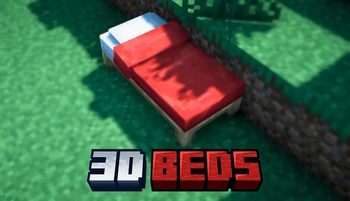
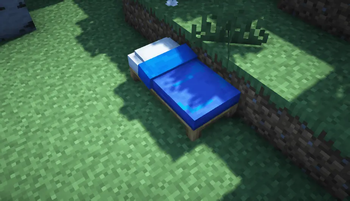
The standard bed in Minecraft has always looked a bit flat and basic, almost like a cardboard box with a texture stretched over it. Better 3D Beds changes that by introducing actual depth to the most important block in your base. Instead of a flat surface, you get a model that actually looks like a piece of furniture you would want in your house.
Every color variant of the bed is covered here. The pack adds 3D elements to the pillows and the mattress, making the whole thing look much softer and physically present in the world. It is a subtle change, but when you walk into a bedroom decorated with these, the difference in quality is pretty obvious. The geometry is clean and fits the blocky nature of the game without looking out of place or too high-poly.
Regarding compatibility, the pack covers a huge range of game versions stretching from 1.12 all the way up to the latest releases. You will need Optifine for the 3D models to render properly, so keep that in mind before loading it up. It works perfectly alongside other resource packs that change the environment, as it only focuses on the bed models themselves.
If you are tired of the default flat beds and want something that feels a bit more premium for your survival world or creative builds, this is a solid pick. It makes your interior design feel just a little bit more detailed without needing to install heavy mods.