Texture pack review
Mad Pixels 64x
Mad Pixels 64x 64x, latest build for Minecraft 26.2
Mad Pixels 64x is a cheerful, clean texture pack that enhances your Minecraft experience with cartoon-like aesthetics and vibrant visuals. Perfect for a variety of builds, this resource pack adds a new layer of fun to your adventures.
- Style
- Simplistic
- Platform
- Java
- Author
- VeryMadCrafter
- First release
- Nov 4, 2025
- Latest version verified
- 26.2
Overview
In-depth
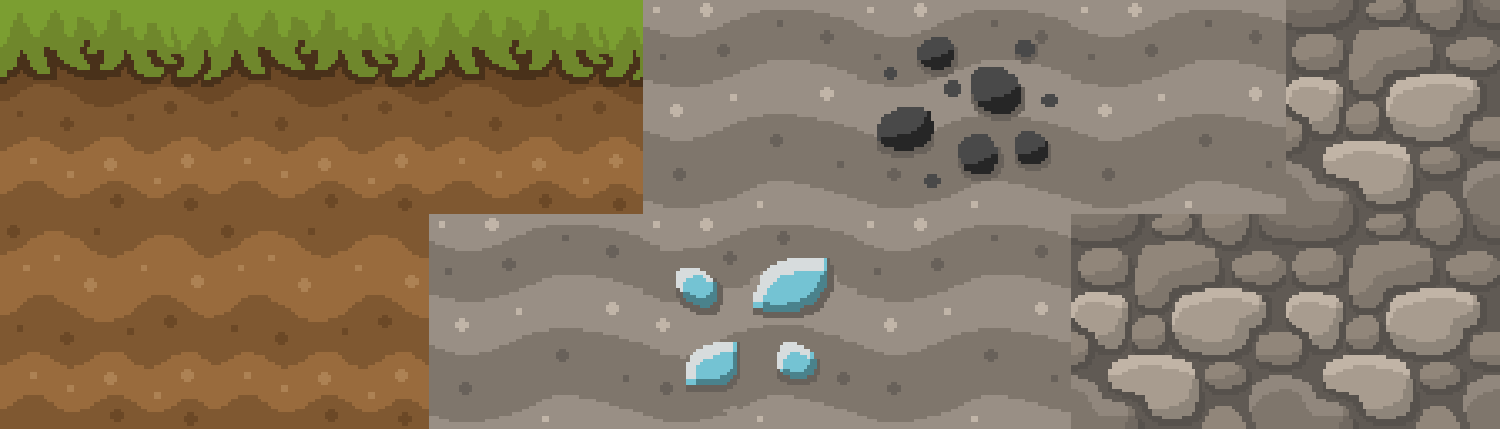
Mad Pixels 64x updates blocks, items, and UI with a clean, colorful approach that leans toward cartoon-like charm. Colors are saturated but not loud, edges are simplified, and most textures keep clear silhouettes so you can read shapes at a glance. The pack focuses on playability rather than photorealism, which helps builds and redstone mechanisms remain easy to understand from a distance.
The Mad Pixels 64x palette favors warm tones and crisp contrast, which makes biomes and structures feel cheerful. Terrain textures keep a moderate amount of detail, so landscapes look interesting without competing with player-made decoration. Items and tools have higher contrast icons that remain legible in inventory, and block faces are consistent to avoid visual noise when stacked.
Performance is tuned for standard use, since the pack targets Minecraft Vanilla and does not introduce extra rendering features. That makes it a practical choice on midrange systems that prefer a cleaner aesthetic over heavy shader reliance. You can browse similar entries on the site via our texture pack directory to compare other clean-style options.
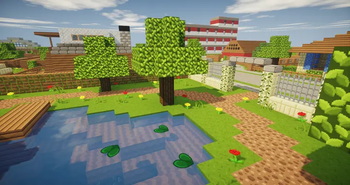
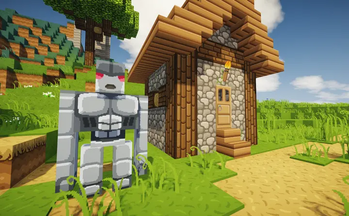
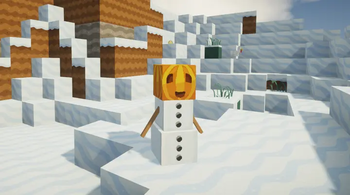
Mad Pixels 64x maintains a friendly look across common environments, from caves to ocean biomes, and it blends particularly well with bright builds like towns and farms. For players who want a playful surface without dramatic complexity, this pack offers a coherent visual language that stays readable during exploration and building. Visit our full texture pack listings to find related clean packs and alternatives that match this style.
Who this is for
This pack suits builders, casual survival players, and content creators who prefer a tidy, colorful presentation. It does not require advanced mods to achieve its look, and it plays nicely alongside quality-of-life resource packs that keep UI elements consistent. If you value clarity and a cheerful tone, Mad Pixels 64x is worth testing in a world where readability matters as much as style.
Gallery
Screenshots
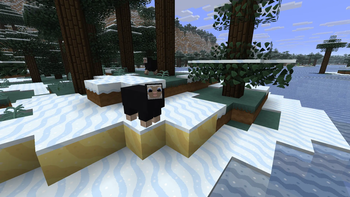
Mad Pixels 64x in game, captured across biomes and lighting conditions.
What you get
Why Mad Pixels 64x?
Clear Readability
High contrast icons and simplified block faces make it easy to identify items and blocks at a glance during gameplay.
Consistent Palette
A cohesive warm color scheme keeps builds and biomes visually unified without clashing details.
Stylized Simplicity
Cartoon-like details provide personality while avoiding the visual clutter of highly detailed packs.
Inventory Clarity
Tool and item textures are designed for legibility, improving inventory management and hotbar use.
Vanilla Friendly
Built for Minecraft Vanilla, it works without extra engine features, making it easy to install and use.
Build Versatility
Clean textures complement a wide range of build styles, from farms and towns to decorative interiors.
Downloads
Get Mad Pixels 64x
The 2 most recent Mad Pixels 64x builds, direct mirror links, no ad redirects.
Install
How to install Mad Pixels 64x
Vanilla route
- 1Download the Mad Pixels 64x pack file from the author page.
- 2Open Minecraft, go to Options, then Resource Packs, and click Open Pack Folder.
- 3Move the downloaded zip into the resourcepacks folder without extracting it.
- 4Back in Minecraft, enable Mad Pixels 64x in the Resource Packs menu and click Done.
- 5Restart Minecraft if textures do not appear correctly after enabling the pack.
Modded route (Minecraft Vanilla)
- 1Install Fabric or Forge and launch Minecraft once to create mod folders, Optifine optional.
- 2Place the Mad Pixels 64x zip into the resourcepacks folder while Minecraft is closed.
- 3If using Optifine, enable relevant settings like connected textures through Video Settings.
- 4Start Minecraft with the chosen mod loader and enable the pack in Resource Packs.
- 5Test the pack in-game and adjust performance settings in Fabric or Forge if needed.
◎ Compatibility
✓ Tested and confirmed working on Minecraft 26.2 and 26.1.2
We ran Mad Pixels 64x on Minecraft 26.2 and 26.1.2 even though the pack was not officially built for these versions. Texture packs typically stay compatible across nearby Minecraft releases, and this one runs as expected.
Troubleshooting
Common problems
Textures appear missing
Confirm the zip is in the resourcepacks folder and not nested inside another folder; enable the pack in the Resource Packs menu and restart the game.
Low frame rate after enabling
Lower Minecraft render distance and check background programs; using Optifine can provide extra FPS tuning options.
Colors look washed out
Check in-game brightness and monitor color profile, and disable any conflicting shader or color-correction mods.
Connected textures not working
Connected textures require Optifine or a compatible mod; install Optifine or a Fabric equivalent and enable CTM settings.
FAQ
Frequently asked questions
What Minecraft versions does Mad Pixels 64x support?+
The pack lists support for 1.21.10, and it should generally work on nearby Minecraft versions even if not officially built for them. Texture packs often remain compatible across adjacent releases, though check for minor visual differences.
Will this pack affect game performance?+
Mad Pixels 64x targets Vanilla performance and is lighter than high resolution options, but systems vary. Adjust render distance and use Optifine for additional performance tuning.
Can I use this on Bedrock Edition?+
This pack is built for Minecraft Java, not Bedrock. Bedrock uses a different format, so conversion would be required and may not preserve all features.
Do I need Optifine to run it?+
Optifine is not required for basic use, but it is helpful for connected textures and additional graphics settings. Many users add Optifine to gain those features.
Is it safe to use on a multiplayer server?+
Using a texture pack client-side is generally safe and does not change server files, but servers with custom resources may recommend or require certain packs. Always follow server rules and verify pack sources.
Ready to install?