Texture Pack // by vexcenot
3D crops Revamped
Stop looking at flat plants and give your garden some depth.
- Latest
- Minecraft 26.1.2
- Updated
- Jul 12, 2026
- Resolution
- —
- Style
- Vanilla+
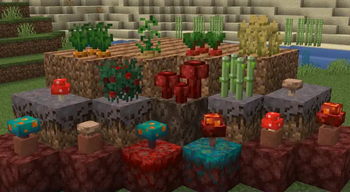
If you have ever spent hours building a farm and felt like the crops looked a bit thin, 3D crops Revamped might be what you need. It is a simple but really effective way to fix how plants look in the game. Instead of the default flat planes that cross over each other, this pack adds actual geometry to your farm plants. It makes your garden look much thicker and more alive without changing the core style of the game.
The pack covers a lot of ground. You will see those new layers on basic food like carrots, potatoes, beetroots, and wheat. It also touches things you might not expect, like mushrooms, sugarcane, and even the stems for your pumpkins and melons. The stems actually have specific colors now, which helps a lot with visibility. One of the best things here is that the creator fixed some common issues found in other vanilla style texture packs, such as those annoying floating textures on leaves or messy edges on the 3D models.
Everything still feels like regular Minecraft. The goal here wasn't to make it look like a different game, just to give those plants some weight. You can easily tell which growth stage a plant is at because the models change clearly as they get bigger. It even supports shaders, so if you use those, the shadows on the little leaves and branches look great. It also includes stuff from the Nether like crimson and warped fungus, so your builds in other dimensions get the same treatment.
It works on a huge range of game versions, so you probably won't have any trouble getting it to run on your current world. If you want to check out other ways to tweak your world, you can browse more packs to find something that fits your style. This one is just a solid choice for anyone who spends a lot of time around a hoe and some seeds.