Texture pack review

Guns ++

Guns ++ latest build for Minecraft 26.2

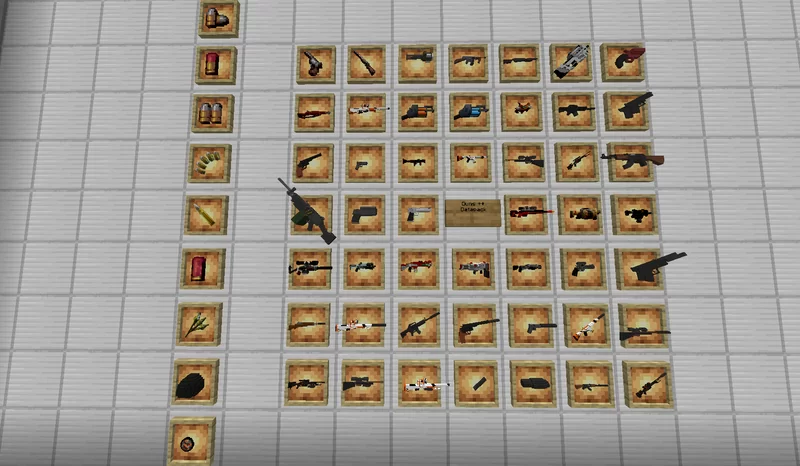
Guns ++ transforms survival and multiplayer combat by introducing over 50 unique firearms and explosives with custom mechanics like recoil patterns, diverse ammo types, and modular attachments.

Platform
Java
Author
ThePatriotsCommandXS
First release
May 29, 2024
Latest version verified
26.2

Overview

In-depth

Guns ++ is a themed texture pack and datapack combo that adds visually distinct firearms, explosives, and related UI elements to Minecraft. It targets players who want a focused combat overhaul, with over 50 weapon models and matching projectile textures. The pack blends realistic weapon skins with clear in-game readability, so items remain identifiable in both close combat and at a distance. You will notice custom crosshairs, ammo counters, and retextured inventories that keep the game organized while showing off the new gear.

ThePatriotsCommandXS designed Guns ++ to work across multiple loaders and game setups, and it includes content that acts like a hybrid between a resource pack and a behavior pack. Many players run this with Fabric or Forge, but it can also be deployed on plain Minecraft Vanilla via the provided datapack elements. For more texture pack options and browsing, see our main texture packs directory at texturespack.com/browse/texture-packs.

Visually, the pack keeps block and environment textures mostly unchanged, focusing its effort on item sprites, entity projectiles, and GUI overlays. That keeps base game performance stable while delivering a themed combat experience. The pack documentation notes modular attachments and varied ammo types, which affect visuals for the same weapon model and help with quick identification during firefights. Compatibility across versions is broad, though some advanced loader features may require Fabric, Forge, or Quilt.

Installation varies by how you play. If you use mods, the pack offers separate loader builds and optional integrations for Optifine and other performance mods. For server operators thinking about multiplayer, the pack includes datapack elements to sync certain mechanics server side, but you should confirm server rules before installing. For more packs in the themed category, try our themed collection at texturespack.com/browse/texture-packs?category=themed.

Who this suits

Guns ++ is best for players who want a combat-focused visual overhaul without changing core terrain aesthetics. It is particularly useful on PvP servers and for players who enjoy modular weapon systems. Read the install instructions below carefully and back up your game before adding the pack.

Gallery

Screenshots

Guns ++ in game, captured across biomes and lighting conditions.

Guns ++ themed Minecraft texture pack screenshot 1

What you get

Why Guns ++?

01

Clear weapon visuals

Weapon sprites and attachments are distinct, making it easier to spot loadouts and ammunition types during combat encounters.

02

Modular attachment art

Attachments alter the appearance of the base weapon, providing visual feedback about equipped mods without opening menus.

03

Minimal terrain changes

Blocks and biomes remain familiar, so the pack focuses visual change on combat assets and user interface elements.

04

Datapack integration

Includes datapack components that can provide server side mechanics, helping keep multiplayer features synchronized.

05

Broad loader support

Designed to work with Fabric, Forge, Quilt, NeoForge, and vanilla setups, increasing the number of compatible playstyles.

06

Readable HUD tweaks

Custom crosshairs and ammo counters present relevant combat information without cluttering the screen.

Downloads

Get Guns ++

The 10 most recent Guns ++ builds, direct mirror links, no ad redirects.

StatusReleaseMinecraftLoaderDateDownload
LatestGuns ++ v5.9.5+modMC 1.21.11Fabric, Forge, NeoForge, QuiltMar 25, 2026Download ↗
ReleaseGuns ++ v5.9.5MC 1.21.11datapackMar 25, 2026Download ↗
ReleaseGuns ++ v5.9.4+modMC 1.21.11Fabric, Forge, NeoForge, QuiltFeb 24, 2026Download ↗
ReleaseGuns ++ v5.9.4MC 1.21.11datapack, Minecraft VanillaFeb 24, 2026Download ↗
ReleaseGuns ++ v5.9.3+modMC 1.21.11Fabric, Forge, NeoForge, QuiltJan 20, 2026Download ↗
ReleaseGuns ++ v5.9.3MC 1.21.11datapackJan 20, 2026Download ↗
ReleaseGuns ++ v5.9.2+modMC 1.21.11Fabric, Forge, NeoForge, QuiltJan 15, 2026Download ↗
ReleaseGuns ++ v5.9.2MC 1.21.11datapackJan 15, 2026Download ↗
ReleaseGuns ++ v5.9.1+modMC 1.21.11Fabric, Forge, NeoForge, QuiltJan 2, 2026Download ↗
ReleaseGuns ++ v5.9.1MC 1.21.11datapack, Minecraft VanillaJan 2, 2026Download ↗

Install

How to install Guns ++

Vanilla route

  1. 1Back up your world and resourcepack folder before making changes.
  2. 2Place the Guns ++ datapack folder into your worlds/datapacks directory.
  3. 3Drop the resourcepack files into the resourcepacks folder in your Minecraft directory.
  4. 4Enable the resource pack and datapack in the game resource packs and datapack menus.
  5. 5Restart Minecraft to ensure textures and datapack functions load properly.

Modded route (datapack / Fabric / Forge / Minecraft Vanilla / NeoForge / Quilt)

  1. 1Install Fabric or Forge and any compatible loader listed by the pack author.
  2. 2Place the resourcepack into the resourcepacks folder and enable it in-game.
  3. 3Install the provided datapack in your world for server side mechanics.
  4. 4Optionally install Optifine for additional shader and quality options, but it is not required.
  5. 5Restart Minecraft with the chosen loader to apply all integrations.

◎ Compatibility

✓ Tested and confirmed working on Minecraft 26.2 and 26.1.2

We ran Guns ++ on Minecraft 26.2 and 26.1.2 even though the pack was not officially built for these versions. Texture packs typically stay compatible across nearby Minecraft releases, and this one runs as expected.

Troubleshooting

Common problems

Weapon textures missing

Confirm the resourcepack is enabled and loaded above other packs; re-download the pack and replace corrupted files if issues persist.

Datapack mechanics not applying

Make sure the datapack is placed in the active world's datapacks folder and use the reload command, or restart the server to force datapack loading.

Conflicts with other mods

Temporarily disable other resource packs or item altering mods to identify conflicts, then re-enable one at a time to isolate the source.

FPS drop when many effects are active

Lower particle settings, try Optifine or performance mods, and reduce render distance to regain smoother frame rates.

FAQ

Frequently asked questions

Which Minecraft versions does Guns ++ support?+

The pack lists multiple supported versions across 1.17 to recent 1.21 releases. Texture packs often remain compatible with nearby Minecraft versions even when not explicitly built for that release, but some loader features may require matching versions.

Will this pack affect game performance?+

Performance depends on the number of active effects and your system. Using Optifine or performance mods can reduce impact, and the pack focuses on items to limit terrain overhead.

Can I use Guns ++ on Bedrock Edition?+

This pack is built for Java loaders and datapack systems, so Bedrock is not directly supported. Bedrock handles resource formats differently and may require a separate conversion.

Do I need Optifine to run the pack?+

Optifine is optional. It can improve performance and add shader compatibility, but the pack should work without it on standard loaders.

Is it safe to run this on a multiplayer server?+

Datapack elements may change mechanics server side, so get admin approval before installing. Server operators should test on a staging world first to confirm behavior.

Textures look wrong after updating Minecraft, what now?+

Reload resource packs and datapacks, and check for updated pack builds. Texture packs generally remain compatible with nearby versions, but loader or datapack features may need updates to match the game.

Ready to install?

Download Guns ++ and jump in