Texture Pack // by Haikis
Low On Fire
Stop losing your sight to flames in Minecraft with Low On Fire.
- Latest
- Minecraft 26.3 / 26.2
- Updated
- Sep 13, 2026
- Resolution
- 16x
- Style
- Tweaks
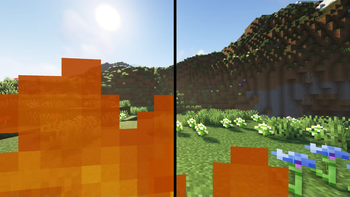
Everyone knows the feeling of walking into a stray fire block or getting hit by a flame bow and suddenly seeing nothing but orange pixels. The default game hides half your vision when you are burning, which is pretty annoying during a fight. Using Low On Fire solves this problem by shifting that fire overlay downward. This way, you still know you are taking damage, but you can actually see the person you are trying to hit or the block you need to jump to.
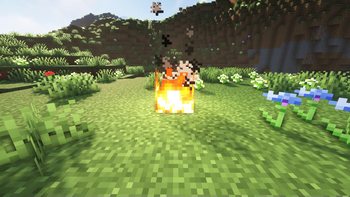
What makes this specific pack nice is that it only touches the first person view. A lot of other Minecraft texture packs change the fire blocks on the ground too, making them look tiny or flat, but this one leaves them alone. The fire in the world looks exactly like vanilla Minecraft, so it won't ruin the look of your fireplace or any nether builds you have going on. It is a simple tweak meant for utility without changing the whole vibe of the game.
It is surprisingly compatible with basically any version of the game you might be playing. It works all the way back to the classic 1.8 days for those who still play older PvP versions and goes all the way up to the newest releases. You do not need any external mods like Optifine to make it work either. It is standard 16x resolution, so it does not hit your frame rate at all. If you want to check out some more options for your world, you can browse texture packs on our main list to find something that fits your style. This is a solid choice if you just want a cleaner view when things get literally heated.