Texture Pack // by GeForceLegend
3D Default
Bring depth to your blocks with the 3D Default resource pack
- Latest
- Minecraft 26.3 / 26.2
- Updated
- Sep 13, 2026
- Resolution
- —
- Style
- Vanilla+
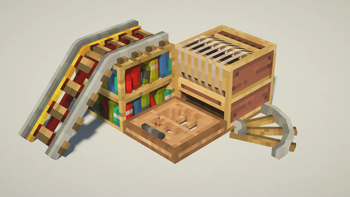
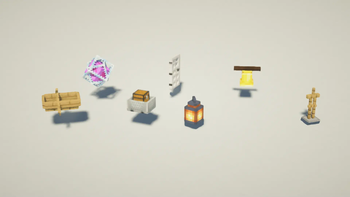
I have always felt like the flat surfaces in Minecraft could use a bit more depth without actually changing how the game looks. The 3D Default pack is a great solution for this because it focuses on adding actual geometry to the blocks we use every day. Instead of just looking at a flat texture, many items and environment pieces get a three-dimensional upgrade that makes the light hit them differently while still feeling like the base game.
It is a pretty light-weight choice if you are looking for new Minecraft resource packs to try out. The main goal here isnt to overhaul the game or make it look hyper-realistic, but to give things like furnaces, rails, or ladders some actual physical volume. It uses the standard textures you are already used to, so it doesnt clash with the vanilla art style at all. It just makes the world feel a bit more tactile and built-out.
One of the best things about this specific project is how far back it goes. It supports versions from 1.14 all the way up to the newest releases. If you still use Optifine, it has custom entity models too, though those won't work on really old versions like 1.8 if you aren't on a newer Optifine build. It is mostly a vanilla-focused experience that sticks to the core aesthetic while adding that extra bit of detail that the default game is missing. You can grab the files from Modrinth to see how it looks in your own world.
Since it doesnt use high-resolution textures, it wont tank your frame rate like some crazy shader or 512x pack might. It is just a solid improvement for anyone who likes the standard look but wants a bit more pop. If you want to see what else is out there, you should browse more packs to find other ways to tweak your game world.