Texture Pack // by robotkoer
Fast Better Grass
Get full grass blocks and nicer paths without needing heavy mods.
- Latest
- Minecraft 26.1.2
- Updated
- Jul 12, 2026
- Resolution
- —
- Style
- Tweaks
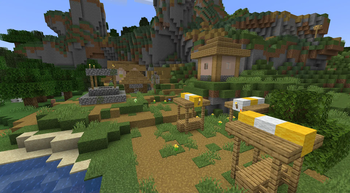
If you have ever played with OptiFine, you probably remember that setting that made grass blocks look completely green on the sides. Fast Better Grass does exactly that, but without requiring any specific performance mods or external dependencies. It works by tweaking the internal models of the blocks so that the top texture wraps around the sides. It is a simple change that makes hills and fields look way less like a brown grid.
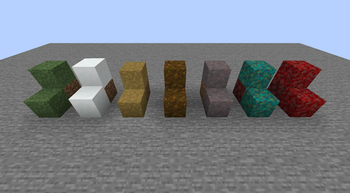
This texture pack covers more than just standard green grass. It applies the same logic to podzol, mycelium, and even the nylium types from the Nether. One of the cooler details is how it handles dirt paths. Usually, paths look like a thin floating layer if they are next to a lower block, but this pack makes the path texture spread downwards. It makes village roads look much more natural and solid against the terrain.
Because Fast Better Grass only modifies the models and not the actual image files, it is compatible with almost any other textures you have installed. If you use a high-resolution pack, this will just pick up those textures and apply them to the sides automatically. It is a lightweight way to clean up your world without sacrificing fps. If you want to find more ways to tweak your game, you can browse more resource packs and see what else fits your style.
It supports a huge range of modern versions, so you can drop it into your folder and it should just work on most recent updates. It keeps things quick and avoids the bloat of larger overhauls.