
Texture Pack // by godkyo98
Icon Fresh
Bring Fresh Animations movement to your Xaero's Map icons
- Latest
- Minecraft 26.1.2
- Updated
- Jul 12, 2026
- Resolution
- —
- Style
- Mod Support
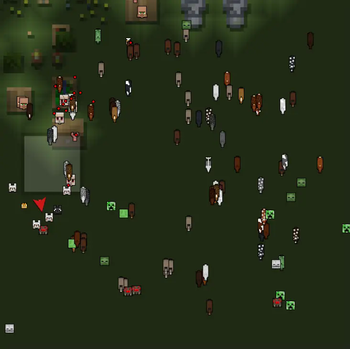
If you have been playing with the famous mob animation mods for a while, you probably noticed that the map icons do not always match the vibe of the creatures walking around your world. The Icon Fresh pack was made to fix that specific problem. It takes the expressive look of Fresh Animations and brings those details directly onto your map interface. This is not just a random set of drawings, it is a focused effort to make your UI feel like it belongs with the rest of your modded setup.
Most players who use Minecraft texture packs to change how mobs move want consistency. This pack focuses on the Xaero's Minimap and WorldMap mods. Instead of the standard, static heads you usually see on your radar, you get icons that mirror the updated models. It makes tracking entities a lot more intuitive because the icons actually look like the specific mobs you are seeing in the game world. The style is clean but maintains those characteristic exaggerated features that make the animations so popular in the first place.
Compatibility is a big part of why this works. It is built to support a massive range of game versions, so you do not have to worry too much about your specific modpack version. If you are running the newest snapshots or updates from 1.21.5 and beyond, make sure you grab the 0.2 version to keep everything showing up correctly. It also plays nice with several extensions like Skeleton Physics, ensuring that even the more niche mob variations get the right visual treatment on your screen. You can find more resource packs that tweak modded interfaces if you want to keep customizing your HUD.
It is a simple change but it makes the game feel a bit more cohesive. You get the same energy from your map that you get from the mobs running around your base. It is worth checking out if you are tired of the default map pins clashing with your high quality mob animations.