Texture Pack // by Oculie
Low Fire
A helpful utility for better visibility and combat in Minecraft
- Latest
- Minecraft 26.1.2
- Updated
- Jul 12, 2026
- Resolution
- —
- Style
- Vanilla+
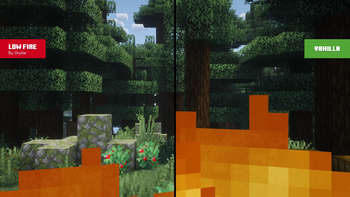
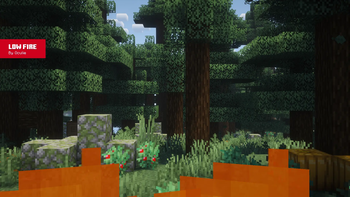
Getting set on fire is one of those things that happens way too often, whether you are falling into a lava lake or fighting someone with a Fire Aspect sword. In the default game, that huge wall of flames basically blinds you. The Low Fire texture pack fixes this annoyance by shrinking the height of that fire animation specifically for your first-person view. It is one of those small Minecraft texture packs that makes a massive difference when you are trying to survive a fight or navigate the Nether.
The technical side of this pack is pretty clever. It cuts down the fire height by exactly six pixels, which is about a 37.5% reduction compared to how it looks normally. The best part is that it only changes what you see on your own screen while you are burning. If you look at fire blocks sitting on the ground, they still look exactly like they always do. This is because the pack uses a model file to separate the fire entity from the actual block texture, so it basically solves the visibility problem without changing the look of the world itself.
Compatibility is great since it works across versions from 1.16 all the way up to the latest releases. Since it stays close to the original look of the game, it won't clash with your other visuals or mods. It is a solid choice if you want to keep the vanilla feel but hate how much screen real estate the fire takes up. If you are looking for other ways to tweak your visuals, you can always browse more packs to see what else fits your style. It is definitely more useful than it sounds once you realize you can suddenly see the mobs you are hitting.