Texture Pack // by GridExpert
New Glowing Ores
Spot every mineral effortlessly with light-up blocks and connected outlines
- Latest
- Minecraft 26.3 / 26.2
- Updated
- Sep 13, 2026
- Resolution
- —
- Style
- Gameplay
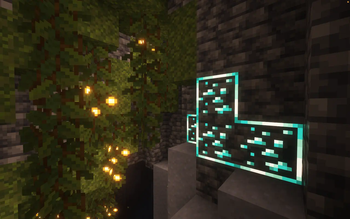
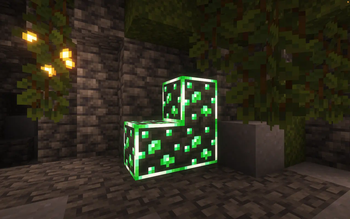
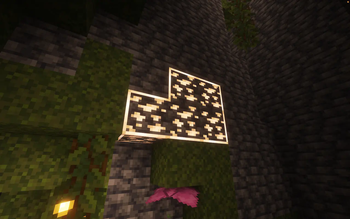
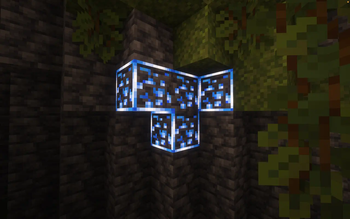
Mining in deep, dark caves can be a pain when you keep running past valuable materials hidden in the shadows. The New Glowing Ores pack solves this by making every ore block shine in the dark. It covers the basics like iron and coal, but also includes things like ancient debris and raw ore blocks. It makes a huge difference when you are down at bedrock level and just want to find diamonds quickly without placing a torch every two blocks.
There are actually two ways to use this pack depending on how you like your visuals. You can go with the default version where just the ore bits inside the stone glow, or you can pick the border version. The bordered option is great because it adds connected lines around the blocks, which makes larger veins look like one big glowing mass. It is one of those Minecraft texture packs that strictly focuses on making life easier during survival gameplay rather than just changing how things look for the sake of it.
To get the glowing effect working, you will need some extra tools. If you use Optifine on Forge or vanilla, it works fine for the basic glow. If you are on Fabric or NeoForge, you will need the Continuity mod. A quick heads up: the border version requires Continuity specifically to handle those connected outlines. It also supports several popular mods like Create and Mekanism, so your modded ores can match your vanilla ones.
Even though the game might say the pack is for an older or different version, it generally works on anything from 1.17 and up as long as you have the right dependencies installed. It is a solid choice if you are tired of squinting at stone walls. You can always browse more packs if you want to find something to pair with these glowing visuals to change the rest of your world.