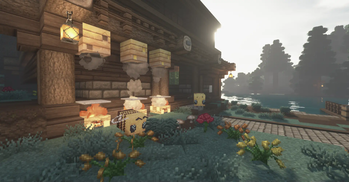
Texture pack review

Ozocraft

Ozocraft 32x, latest build for Minecraft 26.2

Ozocraft Remix merges classic visuals and modern updates for this beloved 32x resource pack, embracing a balanced rustic style.

Platform
Java
Author
darianknight
First release
Aug 17, 2024
Latest version verified
26.2

Overview

In-depth

Ozocraft Remix presents a refreshed take on a classic 32x look, keeping clear lines and readable textures while adding subtle modern touches. The pack favors a clean aesthetic that makes blocks and items easy to distinguish at a glance, which helps both building and exploration without overwhelming the original feel of the game.

The author, darianknight, blends rustic charm with simplified geometry to create a consistent style across blocks, mobs, and UI elements. Colors remain natural and slightly desaturated, lending a cohesive tone to landscapes, interiors, and crafted items. Players who appreciate a calm, tidy presentation will find this texture pack keeps vanilla intent intact while smoothing rough edges and improving clarity.

Performance is unobtrusive because Ozocraft Remix is a 32x pack intended for vanilla Minecraft, so it generally runs well on systems that handle default textures. Some visual updates focus on readability, such as clearer ore faces and more distinct foliage shapes, which can help during mining and navigation. This pack does not depend on shaders, but it pairs nicely with light shader presets for players who want gentle lighting without heavy stylistic change.

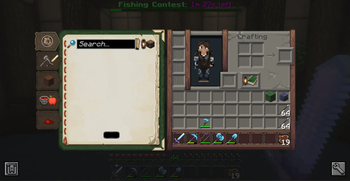
The pack includes updated item sprites and adjusted UI pieces, keeping inventory and hotbar elements familiar but cleaner. Compatibility with recent Minecraft releases is maintained by the author for many versions, and texture packs in this resolution often continue to work across nearby game updates even when not specifically rebuilt. Browse similar options on our main texture pack list for comparisons, and check the clean category for other packs with comparable visual approaches.

Who should try it

Try Ozocraft Remix if you want a tidy, readable texture set that honors vanilla proportions while offering modest polish. It is suitable for builders who want consistent block language, survival players who need clear visual cues, and server operators seeking a nonintrusive art style. For more texture packs, visit our main browse page and for other clean style packs see the category listing.

Gallery

Screenshots

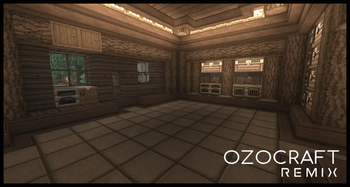
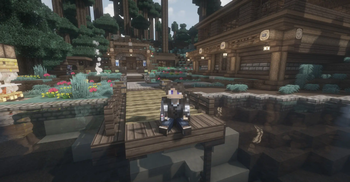
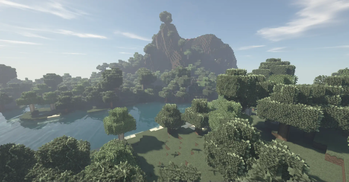
Ozocraft in game, captured across biomes and lighting conditions.

Ozocraft Remix 32x clean Minecraft texture pack screenshot 1Ozocraft Remix 32x clean Minecraft texture pack screenshot 2Ozocraft Remix 32x clean Minecraft texture pack screenshot 3Ozocraft Remix 32x clean Minecraft texture pack screenshot 4Ozocraft Remix 32x clean Minecraft texture pack screenshot 5

What you get

Why Ozocraft?

01

Readability Focused

Clear, simplified textures make ores, plants, and item icons easy to spot during play, reducing misclicks and confusion.

02

Gentle Modern Touches

Subtle updates refresh classic sprites without changing block identity, preserving familiar gameplay cues and proportions.

03

Vanilla Friendly

Designed for Minecraft Vanilla, the pack does not require heavy mods or shaders to look good and perform smoothly.

04

Consistent Palette

A cohesive color scheme keeps landscapes and interiors unified, which helps when mixing many materials in builds.

05

UI Improvements

Cleaner inventory and hotbar elements reduce visual noise while maintaining the look players expect from vanilla.

06

Good Performance

At 32x resolution the textures are a modest upgrade over default art, so most systems handle them without notable slowdowns.

Downloads

Get Ozocraft

The 9 most recent Ozocraft builds, direct mirror links, no ad redirects.

StatusReleaseMinecraftLoaderDateDownload
LatestOzocraft v1.21+.R17MC 1.21.8Minecraft VanillaJun 17, 2026Download ↗
ReleaseOzocraft v1.21.7.R16MC 1.20.2Minecraft VanillaJun 17, 2026Download ↗
ReleaseOzocraft v1.21.7.R15MC 1.20.2Minecraft VanillaJun 17, 2026Download ↗
ReleaseOzocraft v14.9MC 1.21Minecraft VanillaNov 6, 2025Download ↗
ReleaseOzocraft v14.8MC 1.21Minecraft VanillaSep 2, 2025Download ↗
ReleaseOzocraft v1.21R8MC 1.21Minecraft VanillaDec 17, 2024Download ↗
ReleaseOzocraft v3MC 1.21.1Minecraft VanillaOct 29, 2024Download ↗
ReleaseOzocraft v1.21MC 1.21Minecraft VanillaAug 17, 2024Download ↗
ReleaseOzocraft v1.20.4MC 1.20.4Minecraft VanillaAug 17, 2024Download ↗

Install

How to install Ozocraft

Vanilla route

  1. 1Download the Ozocraft Remix resource pack zip from the author or distribution page.
  2. 2Open Minecraft and go to Options, then Resource Packs from the main menu.
  3. 3Click Open Pack Folder to open the resourcepacks directory in your file manager.
  4. 4Move the downloaded zip into the resourcepacks folder, do not extract the zip file.
  5. 5Return to Minecraft and click the pack icon to enable Ozocraft Remix, then Done.

Modded route (Minecraft Vanilla)

  1. 1Install Fabric or Forge along with the version of Minecraft you run, Optifine is optional for extra settings.
  2. 2Place the Ozocraft Remix zip into the resourcepacks folder for the instance you will launch.
  3. 3If using Optifine, enable custom item models or connected textures in the video settings as desired.
  4. 4Start Minecraft with the Fabric or Forge profile and enable the pack via Options, Resource Packs.
  5. 5Test in-game and adjust shader or performance settings if you use additional mods that affect rendering.

◎ Compatibility

✓ Tested and confirmed working on Minecraft 26.2 and 26.1.2

We ran Ozocraft on Minecraft 26.2 and 26.1.2 even though the pack was not officially built for these versions. Texture packs typically stay compatible across nearby Minecraft releases, and this one runs as expected.

Troubleshooting

Common problems

Missing textures after update

Delete the old pack from the resourcepacks folder and re-download the latest Ozocraft Remix zip, then enable the new file in Minecraft.

Blurry textures at distance

Check your video settings for mipmap levels and lower them if needed, also confirm the pack zip was not accidentally extracted.

GUI elements misaligned

Disable other resource packs that modify the UI, then enable Ozocraft Remix alone to verify whether a conflict causes the alignment issue.

FPS drops with shaders

Use a lighter shader preset or disable heavy post processing, since Ozocraft Remix itself is modest but shaders add extra load.

FAQ

Frequently asked questions

Which Minecraft versions does Ozocraft Remix support?+

The pack lists support for many recent 1.20 and 1.21 builds, and some loader versions as noted by the author. Texture packs generally remain compatible with nearby Minecraft versions even when they were not officially built for that release.

Will Ozocraft Remix impact my FPS?+

At 32x resolution the pack has a modest performance footprint compared to higher resolutions, but actual FPS depends on your hardware and any shaders or mods you use.

Can I use this pack on Bedrock Edition?+

Ozocraft Remix is tailored for Java resource pack format, so it is not directly compatible with Bedrock without conversion tools or edits.

Do I need Optifine to run Ozocraft Remix?+

Optifine is not required to use the pack, though Optifine can provide additional options like custom models; texture packs often work fine without it.

Is it safe to run this pack on a multiplayer server?+

Using a client-side texture pack like Ozocraft Remix poses no inherent server risk, though servers may require a specific resource pack for consistent visuals; texture packs generally remain compatible with nearby Minecraft versions even when they were not officially built for that release.

Ready to install?

Download Ozocraft and jump in