Texture pack review

Spunky PVP

Spunky PVP latest build for Minecraft 1.15

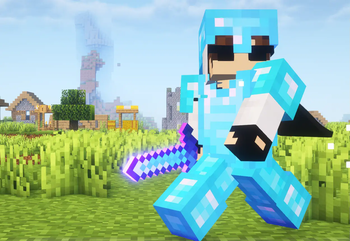
The Spunky PVP Texture Pack revamps the Minecraft combat experience with low lag animations, shorter swords, and clear particles to help players maintain high frame rates during intense duels.

Style
PvP
Platform
Java
Author
spunkyinsaan
First release
Jan 16, 2025
Latest version verified
1.15

Overview

In-depth

Spunky PVP Texture Pack is built around clarity and responsiveness, focusing on elements that matter most during combat. You will notice simplified sword models, reduced particle clutter, and textures tuned to keep important details readable at a glance. The pack favors low contrast where it helps aim, and sharper edges where it matters for hit registration and reaction.

The creator, spunkyinsaan, keeps the approach pragmatic, trimming animations and particle intensity so the game feels faster without changing Minecraft mechanics. This pack is especially useful for players who want consistent visuals that do not distract during fights, while still feeling familiar to vanilla players. It is not a complete overhaul, it targets PvP-related assets so terrain and building blocks remain recognizable.

Performance is a key selling point. By lowering animation complexity and simplifying common combat textures, Spunky PVP Texture Pack can improve perceived frame stability on midrange systems. Many players report that shorter sword models and cleaner critical hit particles make it easier to track opponents during close encounters. For more texture options and to browse similar packs, visit our main library here: https://texturespack.com/browse/texture-packs.

The pack lists compatibility across a wide range of Minecraft versions, though behavior can vary depending on your client and installed mods. If you want to see other PvP focused packs, check the PvP category: https://texturespack.com/browse/texture-packs?category=pvp. Overall, Spunky PVP Texture Pack offers a focused, lightweight adjustment to vanilla visuals aimed at reducing visual noise and helping you concentrate on combat performance rather than decorative detail.

Who should try this pack

Players who primarily engage in duels, practice PvP techniques, or stream competitive Minecraft may find Spunky PVP Texture Pack helpful. It is suited to those who prefer tactical clarity over decorative flair, and to users who want minimal setup changes while keeping a mostly vanilla look.

Gallery

Screenshots

Spunky PVP in game, captured across biomes and lighting conditions.

Spunky PVP Texture Pack pvp Minecraft texture pack screenshot 1

What you get

Why Spunky PVP?

01

Reduced Visual Noise

Simplified particles and fewer distracting effects help you focus on opponents during hectic fights, making target tracking easier.

02

Cleaner Weapon Models

Shorter, clearer sword textures improve sight lines and make timing hits more intuitive during close range engagements.

03

Low Impact Performance

Animations and textures are tuned to be lightweight, which can result in steadier frame rates on midrange hardware.

04

Familiar Vanilla Feel

The pack keeps block and environment visuals recognizable, so navigation and building remain intuitive while combat is optimized.

05

Quick Visual Feedback

Clear hit and critical indicators let you interpret combat events faster, which matters in fast exchanges.

06

Minimal Setup

Designed for easy activation without extensive configuration, letting you get into matches quickly.

Downloads

Get Spunky PVP

The 3 most recent Spunky PVP builds, direct mirror links, no ad redirects.

StatusReleaseMinecraftLoaderDateDownload
LatestSpunky PVP v1.0MC 1.15Minecraft VanillaJan 24, 2025Download ↗
ReleaseSpunky PVP v2.0MC 1.16.5Minecraft VanillaJan 24, 2025Download ↗
ReleaseSpunky PVP v3.0MC 1.15.2Minecraft VanillaJan 16, 2025Download ↗

Install

How to install Spunky PVP

Vanilla route

  1. 1Download the Spunky PVP Texture Pack zip from the pack page.
  2. 2Open Minecraft, go to Options then Resource Packs and click Open Pack Folder.
  3. 3Move the downloaded zip into the resourcepacks folder and return to Minecraft.
  4. 4Hover over the pack in the resource list and click the arrow to enable it.

Modded route (Minecraft Vanilla)

  1. 1Install Fabric or Forge and launch once to create the mods folder; Optifine can be used optionally.
  2. 2Place the Spunky PVP Texture Pack zip into the resourcepacks folder in your Minecraft directory.
  3. 3If using a modded resource loader like Optifine, ensure it is enabled in Options then Resource Packs.
  4. 4Start the modded profile and activate the pack from Options then Resource Packs.

◎ Compatibility

✓ Tested and confirmed working on Minecraft 1.15

We ran Spunky PVP on Minecraft 1.15 even though the pack was not officially built for this version. Texture packs typically stay compatible across nearby Minecraft releases, and this one runs as expected.

Troubleshooting

Common problems

Textures look stretched

Make sure you installed the zip directly into the resourcepacks folder, not extracted into subfolders. Restart Minecraft if the issue persists.

Particles still appear heavy

Check your in-game particle settings and turn particles to minimal, and ensure no other mods override particle behavior.

Items appear missing or black

Confirm you are using a supported Minecraft version; try switching to a nearby supported version if you encounter missing textures.

Pack does not enable

Verify the pack zip is intact and not nested inside another folder, then reload resource packs from the options screen or restart Minecraft.

FAQ

Frequently asked questions

Which Minecraft versions does Spunky PVP Texture Pack support?+

The pack lists many supported versions across 1.15 through 1.21 and several newer snapshots. Texture packs generally remain compatible with nearby Minecraft versions even when they were not officially built for that release.

Will this pack improve my frame rate?+

The pack reduces animation and particle complexity which can lower GPU and CPU load, but actual performance gains depend on your hardware and other mods.

Can I use this pack on Bedrock Edition?+

This pack is intended for Java edition resource packs. Bedrock uses a different format, so direct use on Bedrock is not supported without conversion tools.

Do I need Optifine to run the pack?+

Optifine is not required. Optifine can be used optionally to adjust additional graphics settings and performance improvements.

Will using this pack get me banned on multiplayer servers?+

Most servers allow non-cheating texture packs, but rules vary. Texture packs that only change visuals are normally safe; check server rules before joining.

Textures look wrong after updating Minecraft, what do I do?+

Try switching to a nearby supported version or reload resource packs. Texture packs generally remain compatible with nearby Minecraft versions even when they were not officially built for that release.

Ready to install?

Download Spunky PVP and jump in