Texture Pack // by spunkyinsaan
Spunky PVP Texture Pack
Performance focused visuals for combat and SMP
- Latest
- Minecraft 26.1.2
- Updated
- Jan 24, 2025
- Resolution
- —
- Style
- PvP
Overview
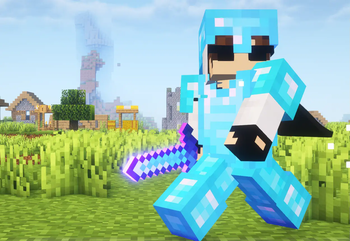
If you spend a lot of time on competitive servers or just enjoy a good scrap on an SMP, you know that clutter is the enemy. The Spunky PVP Texture Pack was built to solve that specific problem. It focuses heavily on keeping your screen clear while giving the game a much more aggressive and sharp feel. Instead of the bulky default items that block your view, this pack streamlines your gear and the world around you so you can actually see what your opponent is doing.
One of the best parts about this texture pack collection entry is how it handles the visuals without tanking your frames. The swords look dangerous with their own unique shapes and glowing effects, yet they don't feel heavy or distracting. The developer, Spunky Insaan, made sure that the particles are vibrant enough to give you feedback on hits without turning your screen into a blurry mess of colors. It makes a massive difference when you are trying to track a target through a combo.
The user interface has been stripped back too. You get a very clean GUI that stays out of your way. Useful blocks like ores and chests have been tweaked so they are easier to spot when you are moving fast. It works across a huge range of versions, starting all the way back from 1.15 up to the newest releases, making it a solid choice regardless of which server version you play on. It is a great alternative to the usual tired resource packs that everyone else is using.
Everything in this pack feels snappy. From the way the animations play out to the reduced height of certain items, it is all about efficiency. If you want something that looks modern and helps you play better without needing a NASA computer, you should definitely give this one a download over on [MODRINTH_LINK] and see how it feels in your next match.
Installation
Install Spunky PVP Texture Pack as a pvp resource pack for Minecraft 26.1.2 using Minecraft Vanilla.
- 01Download the ZIP that matches Minecraft 26.1.2 from the versions below.
- 02Open Minecraft, go to Options → Resource Packs → Open Pack Folder.
- 03Move the downloaded ZIP into that folder without extracting it.
- 04Select Spunky PVP Texture Pack in-game, move it to the enabled column, then press Done.
Downloads
All versions of Spunky PVP Texture Pack