Texture Pack // by thanos
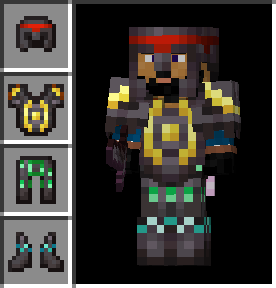
Visual: Armor Trims
Get a visual preview of your armor trims directly in your inventory.
- Latest
- Minecraft 26.1.2
- Updated
- Jul 12, 2026
- Resolution
- —
- Style
- Vanilla+
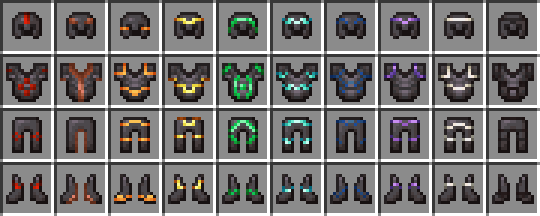
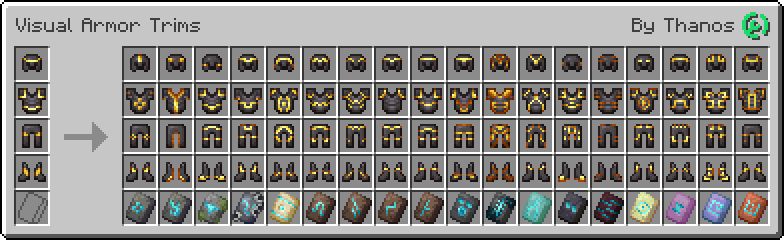
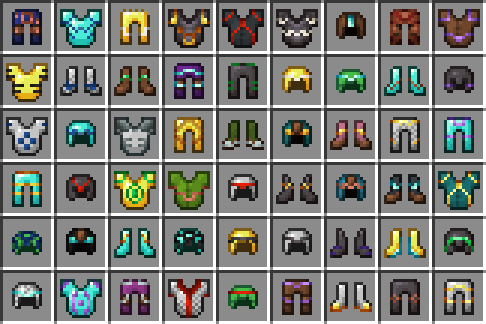
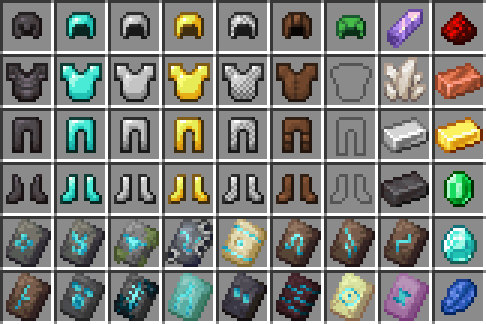
When you spend a bunch of time hunting for templates and finally trim your gear, it is kind of annoying that every piece looks exactly the same in your storage boxes. In the standard game, armor icons just change color based on the material used for the trim, but the actual patterns like Silence or Coast are totally invisible until you actually put the armor on your character. Visual: Armor Trims fixes this issue by giving each armor piece a custom icon that reflects the specific trim pattern applied to it.
This means if you have a chestplate with a gold Coast trim and another with gold Silence, you can finally tell them apart without hovering over them. The pack stays true to the game's original look, so it fits perfectly with other Minecraft texture packs that keep things simple. It basically just brings the detail you see on the 3D player model into your 2D GUI menus and inventory screens.
For anyone playing on version 1.21.5 or newer, this pack works completely in vanilla without needing extra mods. It uses the newer way Minecraft handles item textures to keep things light. If you are stuck on older versions like 1.21.2 or below, you might need something like CIT Resewn or Polytone to get the textures to show up correctly, but for the latest updates, it just works out of the box. It is a really nice quality of life change for anyone who likes to collect all the different smithing templates.
If you want to customize your game even more, you can browse more packs to find other small tweaks like this. It is a great way to make your inventory feel a bit more organized and specialized without changing how the whole world looks.